
In this guide
- The short answer
- What is Agent Experience Optimization, and how it compares with SEO, AEO, GEO, UX, DX and AX
- Why AXO matters now, with the latest data
- How an AI agent actually uses your website, with a capability matrix and an architecture diagram
- Walkthrough: one shopping task, four websites
- The FTA AXO Framework
- 42 best practices across Reach, Read, Understand, Act and Trust
- Before and after code examples
- AXO for ecommerce and agentic commerce protocols
- Myths and unproven tactics
- How to measure agent experience
- A 30-60-90 day plan
- Prioritisation matrix for all 42 practices
- The AXO checklist
- What the FTA Agent Readiness Study 2026 found
- Glossary
- Frequently asked questions
- How we researched this guide, and sources
The short answer
Agent Experience Optimisation (AXO) is the practice of making a website easy for AI agents to reach, read, understand and act on. The goal is simple. When a person asks an AI agent to find, compare or buy something, the agent should be able to finish that job on your website.
SEO helps people find you. GEO and AEO help AI answers mention you. AXO makes sure that when an agent actually arrives, it can use your site. It should not bounce off a bot wall, a blank JavaScript page, or a button it cannot understand.
At FTA Global, we treat AXO as a part of Search Engineering. This guide explains what AXO is, why it matters now, and how AI agents really use websites. It then walks through the FTA AXO Framework, detailed best practices, common myths, a measurement plan, a 90 day roadmap and a full checklist.
What is Agent Experience Optimization?
FTA's definition: Agent Experience Optimization (AXO) is the ongoing work of measuring and improving how well AI agents can reach, read, understand and complete tasks on a website, so that the agent succeeds and your brand gets chosen.
An AI agent is software that does a job for a person. It does not just answer a question. It opens pages, compares options, fills forms and sometimes pays. Examples today include ChatGPT's agent mode, Claude in Chrome, Perplexity's Comet browser and Google's Gemini agents.
Where the idea of "agent experience" came from
The term Agent Experience, or AX, was introduced by Netlify CEO Mathias Biilmann in his January 2025 essay Introducing AX: Why Agent Experience Matters. Netlify defines AX as the holistic experience AI agents have as users of a product or platform. Its focus was mostly software, APIs and developer platforms.
AXO takes that idea to websites, search and marketing. It asks a practical question every brand now faces: when an agent visits my site on behalf of a customer, does it get what it needs, or does it leave and buy somewhere else?
AXO vs SEO vs AEO vs GEO
The first three are about being found and being mentioned. AXO is about being usable. A brand can be cited in every AI answer and still lose the sale if the agent cannot read the price or click the button.
AXO vs UX, DX and AX
AXO also has cousins on the product side. This table below shows how do they differ:
In short: AX is the idea, mainly for software products. AXO is the practice of applying it to websites and measuring it, the way SEO applied search thinking to websites.
Why AXO sits inside Search Engineering
At FTA Global, AXO is a part of Search Engineering, not a separate trend. Search Engineering is our method for making brands findable, citable and chosen across search engines and AI systems. AXO is the last step of that journey: the moment the machine stops reading about you and starts acting on your site.
The same engineering mindset applies. You test how machines see your site, you fix what breaks, and you measure the change. The difference is that the "visitor" is now software working for a human.
Why AXO matters now
AI-driven visits are growing fast, they convert better than other traffic, and yet a large share of website content is still unreadable to machines. That gap is the AXO opportunity.
What these numbers mean together
First, the traffic is real and valuable. Visitors who come through AI tools now buy more often than visitors from many other channels.
Second, most websites are not built for these visitors. When a third of a product page is invisible to machines, the agent is working with half a picture. It may skip your product, misread your price, or recommend a competitor whose page was easier to read.
Third, many sites are blocking agents without meaning to. Security tools, CDN defaults and old robots.txt rules often treat every bot as a threat. That was sensible when bots were mostly scrapers. It is risky when some of those "bots" are customers' shopping assistants.
Which pages are hardest for machines to read?
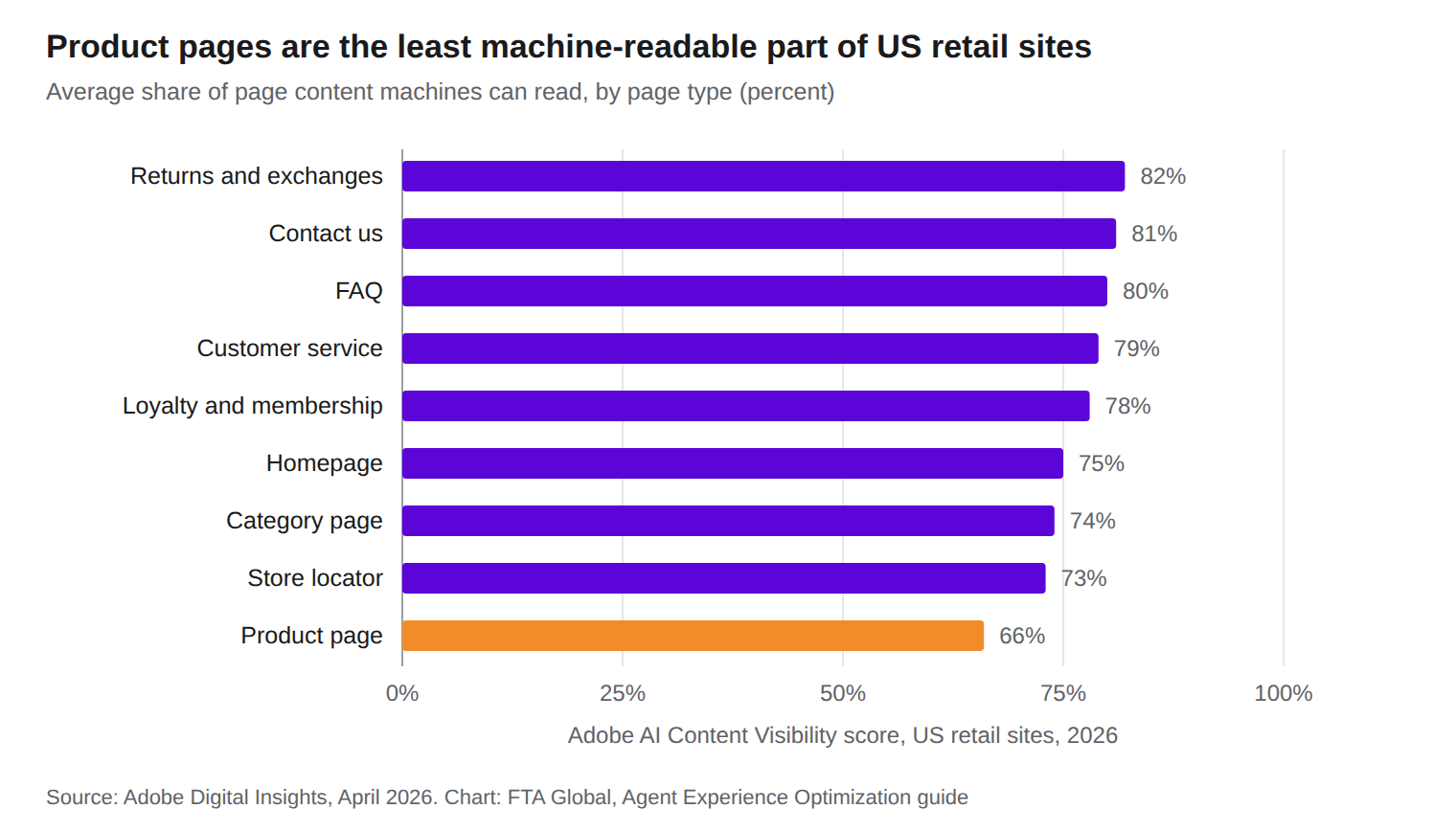
Adobe's data shows the page that matters most for a sale, the product page, is the least readable, with about a third of its content invisible to machines. Policy and help pages do better, but still leave roughly a fifth unread. Source: Adobe, April 2026.
A note on the Indian data
Almost all public data on agent readiness comes from the US and Europe. We could not find a reliable public benchmark for Indian websites. That is why FTA ran its own study of 50 Indian ecommerce sites, summarised near the end of this guide.
How an AI agent actually uses your website
"AI agent" is not one visitor. It is at least five different kinds of software, and each one sees your site differently. Good AXO starts by knowing which one you are designing for.
The five kinds of machine visitors
The first three are simple readers. If your key content is not in the first HTML your server sends, they do not see it. Browser agents are smarter but slower and more fragile. Protocol agents are the future for many transactions, but only if you give them a door.
Capability matrix: what each visitor can and cannot do
The right fix depends on which visitor you are losing. This matrix shows what each type can do today, and the first thing to fix for it.
Sources: Vercel and MERJ for JavaScript rendering, and OpenAI's crawler documentation for robots.txt behaviour. Behaviour differs between companies and changes often, so treat this as a guide, not a guarantee.
The four steps of every agent visit
Every agent visit, from a quick fetch to a full purchase, goes through the same four steps. Each step has its own ways to fail.
- Reach. Can the agent get in? It fails on bot walls, CAPTCHAs, geo blocks, login walls, and robots.txt rules that block the wrong agents.
- Read. Can the agent see the content? It fails when content loads only through JavaScript, hides behind tabs and pop-ups, or is buried in images and PDFs.
- Understand. Can the agent be sure what things mean? It fails when prices, stock, sizes and policies are vague, spread across pages, or missing from structured data.
- Act. Can the agent do the task? It fails on unlabelled buttons, fake links, forms that break without a mouse, surprise pop-ups and multi-step checkouts.
A fifth factor sits over all four: trust. Agents are built to be careful with a person's money and data. If your facts contradict each other, or your policies are unclear, the agent is more likely to pick a site that feels safer.
Architecture: the path of an agent visit
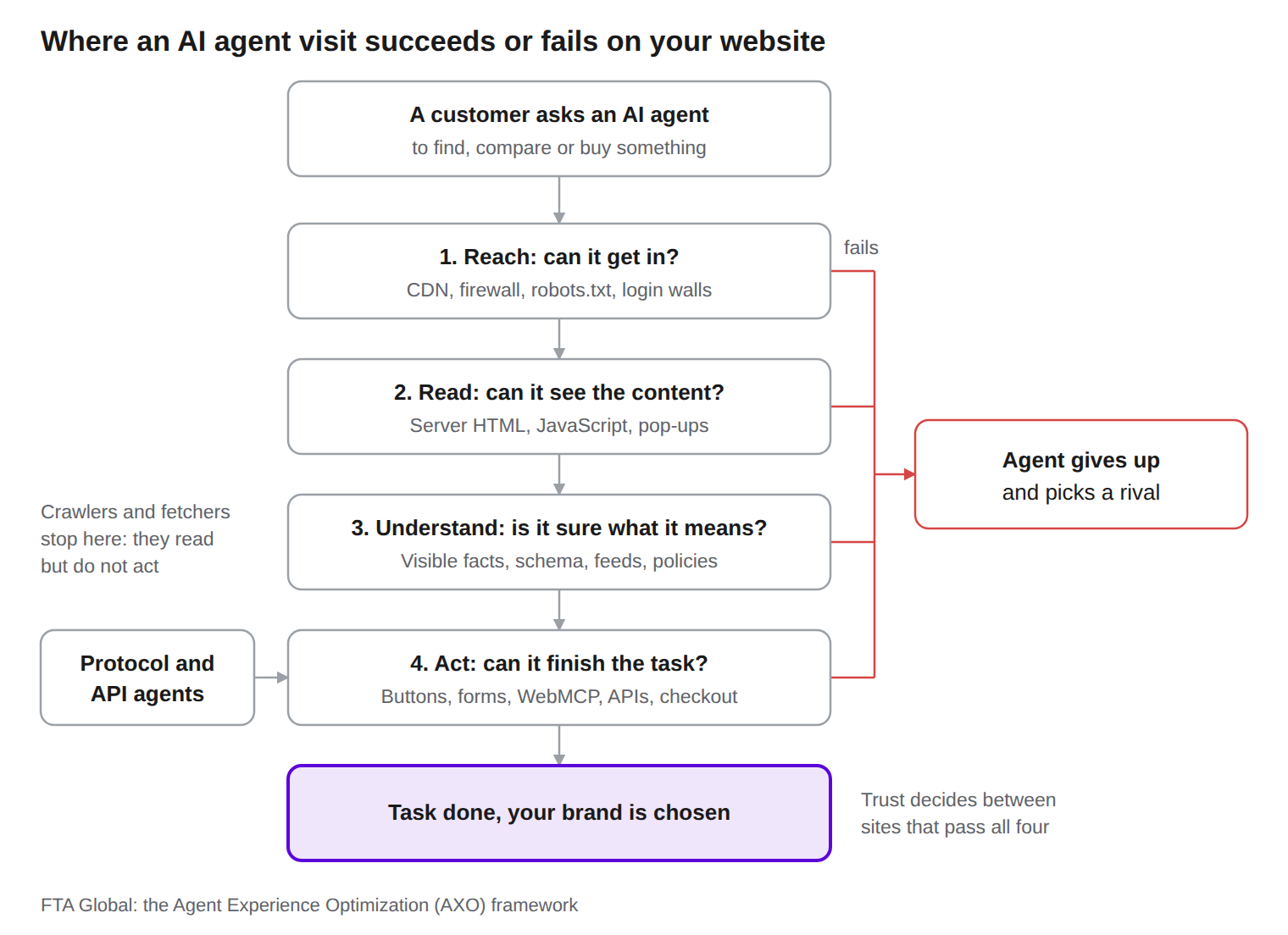
Every agent visit passes through the same four gates, and a failure at any gate sends the agent to a rival. Crawlers and fetchers only need the first three gates, protocol and API agents skip straight to the last one, and trust decides between the sites that pass.
The key difference from human visitors
A human who hits a pop-up closes it. A human who sees a blank space waits for it to load. A human who cannot find the returns policy searches for it.
An agent often does none of this. It works fast, on a budget of time and tokens, for a person who asked for a result. When your site makes the job hard, the agent does not complain. It simply moves on, and you never find out.
Walkthrough: one shopping task, four websites
In agent shopping, the site that wins is often not the cheapest one. It is the one the agent can check fastest and trust most. This walkthrough shows how that happens.
This is an illustrative example built from the failure patterns described in this guide. The four sites are made up. It is not measured data.
The task
A shopper in Pune tells an AI agent: "Find me a navy cotton kurta in size M, under ₹1,500, that can reach Pune by Friday. Order the best option."
The agent searches, finds four shops with a suitable kurta, and visits each one.
What happened on each site
What the shopper saw
The agent replied: "I found a navy cotton kurta in size M for ₹1,349 at Site D. It can reach Pune by Thursday, returns are free within 7 days, and it is in your cart. Two cheaper options could not confirm price or delivery."
Site A was ₹250 cheaper and never got a chance. None of the three losing sites will see this lost sale in their analytics. That is the hidden cost of poor agent experience.
The FTA AXO Framework: five pillars
The FTA AXO Framework scores a website on five pillars: Reach, Read, Understand, Act and Trust. Each pillar matches a step of the agent visit, so every fix maps to a real failure point.
The weights add up to 100 and give an Agent Readiness Score. Reach and Read carry the most weight on purpose. If an agent cannot get in or cannot see the page, nothing else matters.
The weights are FTA's starting view, not a law of nature. We will adjust them as our own test data comes in, and we will publish any change.
How to use the framework
Work the pillars in order. Fixing a checkout form is wasted effort if agents are blocked at the front door. The biggest wins often sit in the first two pillars, and they are often a settings change rather than a rebuild.
The next five sections give the best practices for each pillar. Every practice is tagged with how strong the evidence is:
- Proven: backed by official documentation or published data.
- Likely: strong logic and early evidence, but not yet measured at scale.
- Unproven: promoted by some, but with no clear evidence yet that it helps.
-
Pillar 1: Reach, so agents can get in
Reach comes first because a blocked agent sees nothing at all. Most Reach problems come from old rules and security defaults, not from a deliberate choice.
1. Set a separate policy for each type of AI bot (Proven)
Training, search and user-triggered bots are different, and the big AI companies let you control them separately. OpenAI's crawler documentation says each setting is independent. You can block GPTBot from training and still allow OAI-SearchBot so you appear in ChatGPT search.
A sensible default for most brands:
- Training crawlers (GPTBot, ClaudeBot, Google-Extended, CCBot): your business choice. Blocking them has trade-offs, but it does not remove you from AI search.
- AI search bots (OAI-SearchBot, Claude-SearchBot, PerplexityBot): allow them if you want to be found and cited.
- User-triggered agents (ChatGPT-User, Claude-User, Perplexity-User): allow them. These are your customers' assistants, acting on a live request.
2. Check your firewall and CDN, not just robots.txt (Proven)
Robots.txt is only a polite request. The real gatekeeper is often your CDN or web application firewall. Since July 2025, Cloudflare blocks AI crawlers by default for new customers unless the site allows them.
This matters more for user-triggered agents. OpenAI notes that for ChatGPT-User, robots.txt rules may not apply, because a person started the request. So if those visits fail, the cause is usually a firewall rule, not robots.txt. Ask your tech team to list every bot rule in your CDN, WAF and bot-management tool, and to make an active choice for each AI agent. In FTA's study of 50 Indian ecommerce sites, most firewalls let ChatGPT, Claude and Gemini in but blocked an unknown cloud browser, which is how many newer agents look. So check that your rules do not only allow the agents your security vendor already knows.
3. Do not block by country or data centre by accident (Proven)
The Vercel and MERJ study found the major AI crawlers it measured operate from US data centres. Many Indian sites block or challenge traffic from outside India, or from cloud data centres, to stop fraud. That same rule can shut out every AI agent. Allow verified AI agents even when you restrict other foreign or data centre traffic.
4. Verify bots instead of guessing (Likely)
Fake bots do exist, so blocking by user-agent name alone is weak in both directions. OpenAI and others publish IP ranges for their bots. Newer methods, such as signed agent requests, are spreading. Verification lets you let real agents in and keep scrapers out.
5. Keep key facts outside login walls (Proven)
Agents do not have your customer's password. If prices, stock, delivery rules or return policies only show after login, most agents cannot see them. Show public prices and policies to everyone. Keep login for what truly needs it, such as order history and saved addresses.
6. Avoid CAPTCHAs and challenge pages on pages agents need (Likely)
Challenge pages stop agents cold. Use them on login, checkout abuse and form spam, where they belong. Keep them off product, category, pricing and policy pages, where a blocked agent means a lost customer.
7. Return clean status codes and fix broken links (Proven)
The same Vercel study found AI crawlers waste a large share of their visits on missing pages, far more than Googlebot does. Return a real 404 for missing pages, keep redirect chains short, and never show an error page with a 200 status. Keep your XML sitemap current and list it in robots.txt.
8. Watch agent traffic in your logs (Proven)
You cannot manage what you cannot see. Ask your team to tag AI agent visits in server or CDN logs by user agent and verified IP. Track them weekly, just like you track Googlebot.
Pillar 2: Read, so agents can see your content
If the content is not in the first HTML your server sends, most AI crawlers and fetchers never see it. This is the single most common AXO failure on modern websites.
9. Put key content in the server HTML (Proven)
The Vercel and MERJ study found that none of the major AI crawlers it measured run JavaScript. That covers OpenAI, Anthropic, Meta, ByteDance and Perplexity. They download the page's first HTML and stop there. Google's Gemini and Applebot were the exceptions, because they use full browser rendering.
So anything your site loads later through JavaScript is invisible to those agents. Common victims are prices, stock status, product specs, reviews and delivery dates. The fix is server-side rendering or static generation for all key content. Ask your developers one question: "Is this fact in the HTML before any script runs?"
10. Run the "JavaScript off" test (Proven)
This is the simplest AXO test there is. Open a product page, turn off JavaScript in your browser, and reload. What you see is roughly what a simple AI agent sees. If the price, name or "add to cart" area is blank, you have a Read problem.
11. Do not hide facts behind clicks that load new content (Likely)
Tabs and accordions are fine when the text is already in the HTML and just folded away. They are a problem when clicking them fetches the text from the server. Specs, size guides and policy summaries should be in the page from the start.
12. Write facts as text, not images (Likely)
Prices inside banners, size charts as pictures and offers baked into images are hard or impossible for agents to read. Put every fact that matters in real text. Give every product image a short, specific alt text.
13. Keep pages lean (Likely)
Agents work on a budget. Many fetch tools cut long pages short, and heavy pages full of scripts, tracking tags and repeated menus push the useful facts further down. Keep the main content near the top of the HTML. Remove duplicate navigation blocks and dead code where you can.
14. Use clean, meaningful HTML (Likely)
One clear H1 per page. Headings in a logical order. Real lists for lists, real tables for specs and sizes. Main content inside a main element. This structure helps agents find the part of the page that matters, the same way it helps screen readers.
15. Remove pop-ups that cover the page on arrival (Likely)
Full-screen sign-up offers, app-download prompts and cookie walls can cover the whole page for a browser agent. Some agents close them. Many get stuck or read the pop-up instead of the product. Delay pop-ups, keep them small, and never block the main content on first load.
16. Make pages fast (Likely)
Agents have time limits. A page that takes eight seconds to become usable may be abandoned before the agent reads it. Speed work you do for Core Web Vitals helps agents too.
Pillar 3: Understand, so agents are sure what things mean
An agent acting for a person needs certainty, not hints. It must know the exact price, the exact product and the exact rule before it recommends or buys.
17. State the key facts in plain words near the top (Likely)
For a product, that means name, variant, price, currency, whether tax is included, stock status, delivery time and return window. For a service, it means what is included, what it costs and how to start. Write "₹1,299 including GST, delivered in 2 to 4 days, 7-day returns" rather than leaving the agent to piece it together from badges and icons.
18. Use structured data, and know what it is proven to do (Proven for search features, debated for AI agents)
Schema markup such as Product, Offer, MerchantReturnPolicy, OfferShippingDetails and Organization is proven to power rich results and shopping features in search engines. See Google's merchant listing guidance.
Whether AI agents read schema when they visit a page is a live debate. Some fetch tools strip scripts, and JSON-LD sits inside a script tag. FTA is running its own test on this question. Our advice for now: add complete, accurate schema because it helps search and shopping surfaces today, but never rely on schema alone. Every fact in your schema should also be visible as text.
19. Keep structured data and visible text identical (Proven)
If the schema says ₹999 and the page says ₹1,299, you have a trust problem with search engines and agents alike. Generate both from the same source of truth, and check them for mismatches every time prices change.
20. Use exact, consistent identifiers (Likely)
Use the same product name everywhere: page title, H1, schema, feed and cart. Show SKU, model number, GTIN or ISBN where they exist. Agents compare across sites, and precise identifiers help them match your product to what the person asked for.
21. Answer the obvious questions on the page (Likely)
What size should I choose? Does this work with my phone? Can I return it if it does not fit? A short, plain-text FAQ on product and category pages gives agents direct answers instead of guesses.
22. Be precise about local details (Likely)
For Indian sites this means clear rupee pricing, whether GST is included, cash on delivery rules, and delivery by pincode. For global sites it means currency, region and shipping zones. Vague phrases like "fast delivery" or "easy returns" do not help an agent decide.
23. Keep one source of truth for policies (Likely)
Return, refund, shipping and warranty policies should each live on one clear, public page, linked from every product page. When the same policy appears in five places with small differences, agents cannot tell which one is true.
Pillar 4: Act, so agents can finish the job
A browser agent uses your site the way a screen reader user does: it relies on names, labels and structure, not on how things look. So the best AXO work on this pillar is also good accessibility work.
24. Use real buttons and real links (Likely)
A "button" made from a styled div with a click handler looks fine to a human. To an agent reading the page structure, it may not look like a button at all. Use proper button elements for actions and proper links with real URLs for navigation. Avoid links that point to "javascript:void(0)".
25. Give every control a clear name (Likely)
Icon-only buttons such as a heart, a cart or a magnifying glass need a text name, usually through an aria-label. "Add to cart", "Save to wishlist" and "Search products" tell an agent exactly what will happen. An unnamed icon tells it nothing.
26. Label every form field (Likely)
Every input needs a real label, not just placeholder text that disappears when you type. Use the right input types and autocomplete hints for email, phone, name, address and pincode. This helps agents fill forms correctly, and it helps browsers autofill for humans too.
27. Keep key flows short and predictable (Likely)
Every extra step is a chance for an agent to fail. Allow guest checkout. Avoid forced account creation before showing delivery options. Keep "request a quote" and "book a demo" forms to the fields you truly need.
28. Give every product, variant and filter its own URL (Likely)
When a size, colour or filter changes the page without changing the URL, an agent cannot link to it, share it or come back to it. Stable URLs such as "?size=M&colour=blue" let agents return straight to the right option.
29. Show errors and confirmations as text (Likely)
"Pincode not serviceable", "Only 2 left" and "Added to cart" should appear as real text near the action. A red outline or a small shake animation means nothing to most agents.
30. Expose key tasks as tools with WebMCP (Unproven, early)
WebMCP is a new browser standard that lets a website tell agents exactly which actions it supports, such as "search products", "check delivery" or "add to cart". Chrome opened an origin trial for it in Chrome 149. It is still a draft and the API is changing, so treat it as an experiment. Brands with large catalogues or complex forms should start testing now, because it could become the cleanest way for agents to act on a site.
31. Offer an API or MCP server for high-value tasks (Likely)
For B2B sellers, marketplaces and anyone with complex pricing, the most reliable agent path may skip the web page entirely. A documented API or an MCP server lets agents check stock, get quotes or place orders directly. This is where many procurement agents are heading.
Pillar 5: Trust, so agents feel safe choosing you
Agents are designed to protect the person they work for, so unclear or conflicting information pushes them toward a safer-looking option. Trust is the tie-breaker when two sites are equally easy to use.
32. Make every policy specific and dated (Likely)
"Easy returns" is a slogan. "Return within 7 days of delivery, free pickup, refund to the original payment method within 5 to 7 working days" is a policy an agent can act on. Show a "last updated" date on each policy page.
33. Keep facts the same everywhere (Likely)
Your price, stock and policy should match across your product page, schema, product feed, marketplace listings and business profiles. Agents often check more than one source. A mismatch looks like an error at best and a trick at worst.
34. Show who you are (Likely)
Publish your legal company name, registered address, customer care phone and email, support hours and, for Indian businesses, your GSTIN. Mark this up with Organization schema and link your official social profiles. Agents, like cautious humans, trust businesses that are easy to identify and contact.
35. Show real reviews as text (Likely)
Show the rating, the number of reviews and a few recent reviews as readable text on the page, not only as star images. Never fake or copy reviews. Agents that compare many sources can spot patterns that do not add up.
36. Remove expired offers and dead content (Likely)
An offer that ended last month, still shown on a banner, makes an agent unsure which price is real. Clean up expired promotions, out-of-date policies and discontinued products, or mark them clearly.
37. Avoid dark patterns (Likely)
Pre-ticked add-ons, prices that grow at checkout and hidden fees are bad for humans and worse for agents. An agent that finds a surprise charge may stop the purchase and tell the person why. Show the full cost early.
AXO in practice: before and after code
Most AXO fixes are small changes to templates and settings. These four examples show what "before" and "after" look like. Share them with your developers.
Example 1: A robots.txt policy by bot type
This sample blocks AI training crawlers but allows AI search bots and user-triggered agents. It is one reasonable policy, not the only one. Your firewall and CDN must match it.
# AI training crawlers: blocked (a business choice)
User-agent: GPTBot
User-agent: ClaudeBot
User-agent: Google-Extended
User-agent: CCBot
Disallow: /
# AI search bots: allowed, so you can appear in AI answers
User-agent: OAI-SearchBot
User-agent: Claude-SearchBot
User-agent: PerplexityBot
Allow: /
Disallow: /checkout/
Disallow: /account/
# User-triggered agents: allowed, they act for real customers
User-agent: ChatGPT-User
User-agent: Claude-User
User-agent: Perplexity-User
Allow: /
Disallow: /account/
Sitemap: https://www.example.com/sitemap.xml
Example 2: An "add to cart" button
Before: a styled div. It looks like a button to people, but many agents cannot tell what it does.
<div class="btn-primary" onclick="addToCart(1042)">
<i class="icon-cart"></i>
</div>
After: a real button with a clear name.
<button type="button" class="btn-primary" aria-label="Add Cotton Kurta, Navy, Size M to cart">
<i class="icon-cart" aria-hidden="true"></i> Add to cart
</button>
Example 3: A pincode delivery check
Before: a placeholder only. The hint disappears as soon as someone types, and agents may not know what the field is for.
<input type="text" placeholder="Enter pincode">
<span class="go" onclick="check()">Check</span>
After: a labelled field, the right input type, a real button, and a text result.
<form action="/delivery-check" method="get">
<label for="pincode">Check delivery to your pincode</label>
<input id="pincode" name="pincode" type="text" inputmode="numeric" pattern="[0-9]{6}" autocomplete="postal-code">
<button type="submit">Check delivery</button>
<p role="status">Delivers to 411001 by Thursday. Free delivery.</p>
</form>
Example 4: Product structured data with price, delivery and returns
This JSON-LD describes one product variant with its price in rupees, stock, delivery time and return policy. Every value here should also appear as visible text on the page.
{
"@context": "https://schema.org",
"@type": "Product",
"name": "Cotton Kurta, Navy, Size M",
"sku": "KRT-NAVY-M",
"gtin13": "8901234567890",
"brand": { "@type": "Brand", "name": "ExampleBrand" },
"image": "https://www.example.com/images/kurta-navy.jpg",
"offers": {
"@type": "Offer",
"url": "https://www.example.com/p/cotton-kurta-navy?size=M",
"price": "1349.00",
"priceCurrency": "INR",
"availability": "https://schema.org/InStock",
"shippingDetails": {
"@type": "OfferShippingDetails",
"shippingRate": { "@type": "MonetaryAmount", "value": "0", "currency": "INR" },
"shippingDestination": { "@type": "DefinedRegion", "addressCountry": "IN" },
"deliveryTime": {
"@type": "ShippingDeliveryTime",
"handlingTime": { "@type": "QuantitativeValue", "minValue": 0, "maxValue": 1, "unitCode": "DAY" },
"transitTime": { "@type": "QuantitativeValue", "minValue": 2, "maxValue": 4, "unitCode": "DAY" }
}
},
"hasMerchantReturnPolicy": {
"@type": "MerchantReturnPolicy",
"applicableCountry": "IN",
"returnPolicyCategory": "https://schema.org/MerchantReturnFiniteReturnWindow",
"merchantReturnDays": 7,
"returnMethod": "https://schema.org/ReturnByMail",
"returnFees": "https://schema.org/FreeReturn"
}
}
}
Validate structured data with Google's Rich Results Test before it goes live, and re-check it whenever prices change.
AXO for ecommerce and agentic commerce
Ecommerce is where AXO turns directly into revenue, because agents are starting to shop, compare and pay. Two things change for online stores: the product page must work for agents, and new "agent doors" such as product feeds and commerce protocols now sit next to the website.
The protocols to know
The standards are new and changing every few months. Here is where things stand as of September 2026.
You do not need to adopt every protocol today. You do need someone on your team watching them, and clean product data that can feed whichever one wins in your market.
38. Treat your product feed as an AXO channel (Proven)
Product feeds already power Google Shopping, and ChatGPT's shopping features now take merchant feeds too. Keep one master product feed with complete titles, prices, stock, variants, images, GTINs and policies, and sync it often. A stale feed tells agents the wrong price.
39. Make every variant readable (Likely)
Size, colour and pack size should each show their own price and stock status in the page text, not only after a click. An agent asked for "size 9 in black" needs to see that exact option exists and is in stock.
40. Show delivery and total cost early (Likely)
Let anyone check delivery by pincode without logging in. Show delivery charges, cash on delivery rules and GST on the product page, not only at the last checkout step.
41. Keep checkout simple and standard (Likely)
Guest checkout, clear field labels, standard payment options and no surprise steps. Every custom widget in checkout is a place where a browser agent can get stuck.
42. Prepare for agent payments in India (Likely)
The UPI agentic payments pilot shows where Indian commerce is heading. Talk to your payment gateway about their agent payment roadmap now, so you are ready when it moves beyond pilot.
AXO myths and unproven tactics
A new field attracts quick fixes, so it is worth being clear about what is not proven. Here are eight common claims and where the evidence stands.
Myth 1: "AXO is just SEO or GEO with a new name"
Not true. SEO and GEO are about being found and being cited. AXO is about being usable once the agent arrives. A page can rank first and be cited everywhere, and still fail an agent that cannot read the price or press the button.
Myth 2: "You must have an llms.txt file"
Unproven. llms.txt is a proposed file that summarises a site for AI systems. In June 2025, Google's John Mueller wrote that no AI system currently uses llms.txt. In 2026 he still described its value as purely speculative. It costs little to add, so there is no harm in having one. Just do not put it ahead of the proven work in Reach and Read.
Myth 3: "Blocking all AI bots protects your business"
Half true. Blocking training crawlers is a fair business choice. Blocking every AI agent also blocks your customers' shopping assistants and your presence in AI search. Decide bot by bot, as described in Pillar 1.
Myth 4: "If Google can read my site, AI agents can too"
Not true. Googlebot runs JavaScript. The Vercel and MERJ study found that most other AI crawlers do not. A site that ranks well in Google can still look empty to ChatGPT's or Claude's fetchers.
Myth 5: "Schema markup alone makes you agent-ready"
Not proven. Schema helps search and shopping features. Whether AI agents read it when they visit is still debated, and FTA is testing it. Visible, plain-text facts are the safer foundation, with schema on top.
Myth 6: "Agents will only use APIs, so websites do not matter"
Not for years. Protocols and APIs are growing, but most agents today still read and use ordinary web pages. The winning approach is both: a website agents can use and, where it makes sense, a direct door through feeds, APIs or MCP.
Myth 7: "You need a separate version of your site for agents"
Unproven for most brands. Some companies are experimenting with agent-specific versions of pages. For most websites, one well-built page that serves humans and agents equally is simpler and avoids any risk of showing different content to different visitors.
Myth 8: "AXO only matters for online shopping"
Not true. Gartner expects AI agents to intermediate more than $15 trillion of B2B spending by 2028. Travel, banking, insurance, SaaS and healthcare all have tasks agents will do for people: compare plans, check eligibility, book a slot, request a quote.
How to measure agent experience
Measure AXO with six numbers: agent access rate, agent visits, facts visible without JavaScript, task success rate, AI referral revenue and your overall Agent Readiness Score. Together they show whether agents can get in, read, act, and bring business.
Build a simple task test
The task success rate is the most honest AXO metric, because it tests what agents actually do. Pick 10 real tasks a customer's agent would try on your site, such as "find the price of product X", "check delivery to pincode 400001" or "what is the return window?". Run each task in three or four agents every month. Record whether the agent succeeded, how many steps it took, and where it got stuck.
Open tools are starting to appear for this. Netlify, for example, has released AXIS, an open source framework that runs real agents against real scenarios and scores the result.
Watch for false comfort
A rise in AI referral traffic does not prove your site works well for agents. It may only mean more people use AI tools. Always pair traffic numbers with access and task success numbers, so you know whether agents are succeeding or just arriving.
A 30-60-90 day AXO plan
Spend the first 30 days finding out what agents see, the next 30 fixing Reach and Read, and the last 30 on Understand, Act and Trust. Most of the early work is settings and templates, not a rebuild.
Who should own AXO
AXO sits across teams. SEO or Search Engineering usually leads, because it already owns how machines see the site. It needs engineering for rendering and templates, security or IT for bot and firewall rules, ecommerce or product for flows and feeds, and legal for policy pages. Give one person clear ownership, or the work will fall between these teams.
Prioritisation matrix: all 42 practices
Start with the practices that are low effort and high impact: numbers 1, 2, 3, 6, 10, 17, 25 and 26. Most of them are settings or template tweaks, and they unlock everything else.
Evidence comes from the tags used throughout this guide. Effort and impact are FTA's judgement for a typical mid-to-large website, not measured values. Your stack may change the effort.
The AXO checklist
Use this list to check any page template in under an hour. Each item links back to a practice above.
Reach
- ☐ Robots.txt has a separate, deliberate rule for training, search and user-triggered AI agents
- ☐ CDN, firewall and bot tools allow the AI agents you want, and you have checked their defaults
- ☐ Country or data centre blocks do not stop verified AI agents
- ☐ Prices, stock and policies are visible without login
- ☐ No CAPTCHA or challenge page on product, category, pricing or policy pages
- ☐ Missing pages return a real 404, and redirect chains are short
- ☐ XML sitemap is current and listed in robots.txt
- ☐ AI agent visits are tracked in logs
Read
- ☐ Name, price, stock, delivery and key specs are in the HTML before any script runs
- ☐ The page still shows its key facts with JavaScript turned off
- ☐ No key facts only inside images
- ☐ Main content is near the top of the HTML, with one clear H1
- ☐ No full-screen pop-up on first load
- ☐ The page is fast enough to use within a few seconds
Understand
- ☐ Key facts are written plainly near the top, including tax and currency
- ☐ Product, Offer, return policy, shipping and Organization schema are complete
- ☐ Schema and visible text match exactly
- ☐ Product names and identifiers are the same across page, schema and feed
- ☐ Common questions are answered in plain text on the page
- ☐ Each policy lives on one clear page
Act
- ☐ Actions use real buttons, and navigation uses real links
- ☐ Every icon button has a text name
- ☐ Every form field has a proper label and the right input type
- ☐ Guest checkout and short forms are available
- ☐ Variants and filters have their own URLs
- ☐ Errors and confirmations appear as text
- ☐ A WebMCP or API pilot is planned for your highest-value task
Trust
- ☐ Policies are specific and show a last updated date
- ☐ Prices and policies match across site, feed and marketplaces
- ☐ Company name, address, contact details and GSTIN (India) are published
- ☐ Ratings and reviews are shown as text
- ☐ Expired offers are removed
- ☐ The full cost is shown before checkout
What the FTA Agent Readiness Study 2026 found
We tested 50 leading Indian ecommerce sites in September 2026, first with a technical crawl and then with 450 real shopping tasks run by Claude, GPT and Gemini. The results sharpen several practices in this guide.
What this means for the practices in this guide
- Clarity comes first: Unclear information caused more failed tasks than blocking did. Practices 17, 21, 23 and 32, on plain facts and single, specific policies, matter more than many teams assume.
- Firewalls matter most for newer agent: Most firewalls let ChatGPT, Claude and Gemini in, but blocked our unknown cloud browser. Newer agents that browse from cloud machines may look the same, so practice 2 is about not only allowing the agents your vendor already knows.
- JavaScript is a real barrier: Practice 9 held up: agents that cannot run JavaScript said so when they failed.
- robots.txt still counts: The one site that blocks shoppers' agents in robots.txt was among the hardest for agents to use, as practice 1 predicts.
Read the full study: FTA Agent Readiness Study 2026. It includes the full method, the category results and the top five sites.
We are also running a separate test on a question the industry keeps arguing about: do AI agents actually use schema markup? We will share those results too.
Glossary of AXO terms
Plain meanings for the terms used in this guide, in alphabetical order.
Frequently asked questions
What is Agent Experience Optimization?
Agent Experience Optimization (AXO) is the practice of making a website easy for AI agents to reach, read, understand and act on, so an agent can complete a task for a person on your site. At FTA Global, AXO is part of Search Engineering.
What does AXO stand for?
AXO stands for Agent Experience Optimization. It builds on AX, or Agent Experience, a term Netlify CEO Mathias Biilmann introduced in January 2025.
How is AXO different from GEO and AEO?
GEO and AEO help your brand get mentioned and cited in AI answers. AXO makes sure that when an AI agent visits your site to do something, such as compare, book or buy, it can actually do it.
Do AI agents run JavaScript?
Most AI crawlers and fetchers do not. A Vercel and MERJ study found that major crawlers from OpenAI, Anthropic, Meta, ByteDance, and Perplexity do not render JavaScript. Full browser agents, such as ChatGPT agent mode, do run JavaScript, but they are slower and can still get stuck.
Should I block AI bots?
Decide by bot type. Blocking training crawlers is a business choice. Blocking AI search bots removes you from AI answers. Blocking user-triggered agents blocks your own customers' assistants.
Does llms.txt help AXO?
There is no clear evidence yet. Google has said no AI system is known to use it. It is cheap to add, but it should not come before fixing access and readability.
How can I test my site's agent experience?
Start with three checks. Turn off JavaScript and reload your key pages. Review your bot rules in robots.txt and your CDN or firewall. Then ask two or three AI agents to do real tasks on your site and note where they fail.
How long does AXO take?
The first big wins, such as unblocking the right agents and fixing bot rules, can take days. Moving key content into server HTML and fixing templates usually takes one to three months, depending on your tech stack.
How we researched this guide
This guide is built on primary documentation and published data, with every claim linked and every practice graded by evidence. Here is exactly how we put it together.
- Primary documentation first. For how bots and standards work, we used the companies' own pages: OpenAI's crawler documentation, Chrome's WebMCP documentation, Google's structured data guidance and Netlify's writing on agent experience.
- Published data only. Every number comes from a named, linked source, such as Adobe, McKinsey, Gartner, Vercel and MERJ, and Cloudflare. We did not estimate or model any figure ourselves.
- Evidence grading. Each of the 42 practices is tagged Proven, Likely or Unproven. Proven means backed by official documentation or published data. Likely means strong logic and early evidence. Unproven means promoted by some, but not yet shown to help.
- Clear labels on judgement. Where the guide gives FTA's view, such as the framework weights and the effort and impact ratings, it says so.
- Illustrations marked as illustrations. The walkthrough and code samples are teaching examples, not measured results.
- Our own testing. The FTA Agent Readiness Study 2026 added first-hand data from 50 Indian ecommerce sites and 450 real agent tasks, summarised in this guide.
Update log
Sources
- Introducing AX: Why Agent Experience Matters, Mathias Biilmann, January 2025
- Agent Experience, Netlify
- AI traffic grows but retail sites lag in AI search visibility, Adobe, April 2026
- Adobe: AI-referral traffic spending, converting more than counterparts, Digital Commerce 360, August 2026
- The automation curve in agentic commerce, McKinsey
- Gartner: AI agents will command $15 trillion in B2B purchases by 2028, Digital Commerce 360, November 2025
- The rise of the AI crawler, Vercel and MERJ, December 2024
- Cloudflare will now, by default, block AI bots, MIT Technology Review, July 2025
- Overview of OpenAI crawlers, OpenAI
- Join the WebMCP origin trial, Chrome for Developers, June 2026
- Merchant listing structured data, Google Search Central
- Razorpay, NPCI, OpenAI launch pilot for Agentic Payments, Business Today, October 2025
- Google: No AI system currently uses llms.txt, Search Engine Roundtable, June 2025
- Google says llms.txt is purely speculative for now, Search Engine Journal, 2026

Do you want more traffic?

I watched Meta's Muse shop for Running Shoes. Here's why I’m betting next on AXO (Agentic Experience Optimization)