Home
->
Simulations
->

Why Is Mobile Traffic Down on My Website?

FTA Simulation Library

Mobile Traffic Collapsed. Desktop Looks Fine.

Your rankings are stable across devices. Desktop performance is steady. But mobile traffic and conversions have dropped sharply.
Rankings
No change
Positions are consistent across mobile and desktop despite traffic loss.
Traffic
-44% mobile
Mobile traffic dropped sharply while desktop remained flat, signaling a device specific issue.
Revenue
-23% mobile CVR
Mobile conversion rate is 0.4% versus 3.1% on desktop with 91% bounce rate.
Your role
You need to isolate mobile specific performance gaps across indexing, experience, and competitive positioning before the issue is misdiagnosed as site wide.
Fix mobile first indexing gaps by aligning structured data and technical signals across devices
Improve mobile experience by prioritizing above the fold visibility and reducing friction points like intrusive elements
Close the mobile performance gap against faster competitors with targeted speed and UX improvements within realistic timelines
The simulation

Swipe through each round.

One round at a time. Choose an option, see micro feedback, then move to the next step. The finalscreen reveals your archetype.
FTA Simulation 06 — Mobile Traffic Drop Only.
Round 1 of 10
Diagnosis

TL;DR

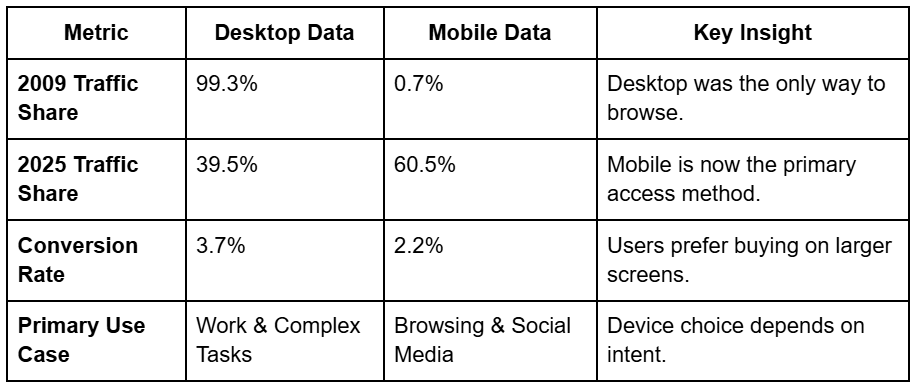
  • Mobile currently accounts for 60.5% of global web traffic, making any drop a significant threat to business growth.
  • A mobile-only decline often stems from poor Core Web Vitals, specifically slow loading speeds or unstable layouts on smartphones.
  • Desktop conversion rates (3.7%) remain nearly double mobile rates (2.2%), which helps explain why desktop traffic often stays stable during task-oriented browsing.
  • Content not optimised with FAQ schema or concise snippets may lose visibility in AI-driven results, such as Google AI Overviews.
  • Recovery requires segmenting data by device to isolate whether the issue is a site-wide penalty or a mobile-specific technical error.

Comparing Mobile vs. Desktop Performance (2009–2025)

Understanding the shift from desktop dominance to mobile-first browsing.

Why did my mobile traffic drop, but desktop stayed the same?

When you see a decline in website traffic that affects only mobile users, the problem is rarely your content's quality. Instead, it is likely a technical or user experience (UX) issue specific to smaller screens.

A common cause is a failure in Core Web Vitals mobile metrics. 

Google uses mobile-first indexing, meaning it primarily looks at the mobile version of your site for ranking. If your mobile pages load slowly (LCP), have shifting elements (CLS), or delayed interaction (INP), your rankings will fall on mobile while remaining stable on desktop.

Another reason is  Index Bloat.  

Sometimes, after a site migration, old URLs or domains remain indexed. This clutters search results and confuses Google's crawl budget. Because mobile users rely on quick, clean search results, these legacy pages can leak traffic away from your high-performing mobile landing pages.

How to fix mobile website traffic decline?

To fix mobile SEO, you must start with a technical audit. Use Google Search Console to segment your traffic by device. If the drop is isolated to mobile, check for the following:

  • Broken Redirects: Ensure all mobile-specific URLs redirect correctly. Broken links (404s) waste link equity and frustrate users.
  • Asset Optimization: Compress images and switch to modern formats like WebP or AVIF. Mobile networks are often slower than desktop connections, so every kilobyte matters.
  • Navigation Issues: Clunky menus or buttons that are too small for thumbs will drive mobile users away, increasing your bounce rate.
  • Pop-up Interference: Intrusive pop-ups that cover the entire smartphone screen can trigger Google penalties and hurt mobile-specific rankings.

Why are desktop conversion rates higher than mobile?

Even if your mobile traffic dropped, you might notice your desktop traffic is stable and converting well. Research shows that desktop conversion rates are roughly 3.7%, compared to just 2.2% on mobile.

This happens because users often use different devices at different stages of the buying journey. A customer might discover a product on their smartphone while commuting, but wait until they are at a desktop computer to finish the purchase. 

Desktop computers are preferred for high-intent tasks such as filling out long forms, comparing complex data, or entering credit card information.

As a result, brands must ensure a seamless transition. For example, allowing a user to save an item to a mobile cart and find it ready on a desktop can prevent total loss of traffic.

How do AI search and LLMs affect mobile traffic?

Search is changing. With the rise of Google AI Overviews, ChatGPT, and Perplexity, users are getting answers directly in the search interface without clicking on a website. This zero-click trend hits mobile traffic harder because mobile users want immediate answers.

To protect your traffic, you must optimize for AI search and LLMs:

  • FAQ Sections: Use Q&A blocks that answer questions in a conversational tone.
  • Schema Markup: Implement  Structured Data  (Product, FAQ, and LocalBusiness schema) so AI models can easily parse your information.
  • Concise Snippets: Place a short summary at the beginning of each section to capture featured snippet spots in search results.

Failure to adapt to these AI-driven channels can lead to a steady website traffic decline, even if your traditional keyword rankings look healthy.

How to check for Google algorithm updates affecting mobile?

Google regularly updates its ranking systems, and these updates often target mobile usability. If your mobile traffic dropped suddenly, check the Google Search Console  Performance report.

Look for a correlation between the drop and any announced Google Core Updates. If your impressions (how often you show up) dropped, it’s likely an indexing or ranking issue. If your clicks dropped but impressions stayed the same, your titles and meta descriptions might no longer be compelling to mobile users.

Additionally, monitor your Crawl Stats. If Google's crawl budget is being wasted on irrelevant pages or broken scripts, your most important mobile pages won't be updated in the search index, leading to a loss of visibility.

What is the best action plan for traffic recovery?

Recovery must be methodical. Speed is essential to stop the revenue bleed.

  1. Stabilize (Hours): Fix server downtime and roll back any recent site changes or bad deployments that happened right before the drop.
  2. Restore Indexing (Days): Identify deindexed pages in Search Console and fix robots.txt blocks or incorrect noindex tags.
  3. Optimize Performance (1-2 Weeks): Address Core Web Vitals mobile failures. Minify CSS/JS and defer non-critical scripts to speed up the mobile experience.

Validate (Ongoing): Use tools like Lighthouse to continuously monitor mobile page speed and ensure your tracking tags (like GA4) are actually firing on mobile devices.

Recover Your Lost Traffic Today
A sudden decline in website traffic can be overwhelming, but it is a solvable challenge.
About FTA
FTA logo
We are a Search Engineering™ company that helps brands become visible across search engines, AI assistants, and modern discovery systems where decisions happen before clicks.
‍
Our integrated model combines Search Engineering for organic and AI visibility, Demand Labs for enterprise B2B growth, Performance Labs for B2C acquisition, FTA Prime for startup marketing, and Creative Labs for storytelling. At the core is a proprietary visibility platform (patent pending) built on ICP-based persona modelling that tracks how brands appear across AI environments.
‍
With 80+ A-star professionals across Mumbai, Bengaluru, and Gurugram, we are mentored by an advisory board of SMEs across Retail, Ecommerce, BFSI, Life Sciences, Healthcare, Education, Aviation, and Technology, along with professors from GWU and IIMs.
FTA is built as a modern marketing company.
Table of contents

Do you want 
more traffic?

Hey, I'm from FTA Global. I'm determined to grow a business. My only question is, will it be yours?

Ready to engineer your outcomes?